SCALAN vs. Microsoft Copilot Studio
The Copilot Studio alternative for
custom AI agents
Do you want to provide your departments with AI agents while centrally managing access, quality, and costs? With SCALAN, you get a unified platform where your company can create, securely operate, and further develop custom AI agents.



Used & loved by leading organizations


.png)




SCALAN or Copilot Studio: the decision at a glance
SCALAN and Microsoft Copilot Studio allow you to create custom AI agents and connect them with knowledge, systems, and actions. The key difference lies in how you build these agents and the technical and organizational framework in which you operate them.

Microsoft Copilot Studio
Ideal for a company-wide Microsoft-first platform strategy
Microsoft Copilot Studio becomes compelling when you want to integrate AI agents as a core component of your existing Microsoft platform strategy and have the knowledge and capacity for their operation and maintenance. This additional platform depth is a particular advantage for complex enterprise architectures.

Your company is strategically committed to Microsoft and the Power Platform.
Your IT or implementation partner has the necessary platform expertise and capacity
You want to manage AI agents using existing Microsoft environments and governance structures.

SCALAN
Ideal for easy building and controlled, independent operation of custom AI agents
A perfect choice for mid-sized businesses and SMEs looking for an independent platform for custom AI agents that prioritizes ease of use, centralized management, and minimal operational overhead. SCALAN empowers departments to build their own agents while allowing IT to maintain control over models, access rights and costs.
Departments create and maintain AI agents using natural language, tailored to their specific requirements.
IT centrally manages models, system access, and permissions, while keeping a close eye on execution and costs.
German provider, data processing in Frankfurt, free choice of models
SCALAN as a Copilot Studio alternative: Differences in day-to-day operations
How do you create custom AI agents, who handles functional changes, and how does your IT maintain control? This direct comparison shows how both platforms solve these tasks and where SCALAN relieves the burden on your business departments.
Creating agents: With SCALAN, your process description becomes an executable workflow
Copilot Studio supports creation in natural language and connects instructions, tools, and visually modeled workflows. For detailed process logic, topics and flows are available, with steps and conditions that can be mapped in a node graph.
SCALAN lets you design the entire workflow in natural language. An AI assistant guides you through an interview and helps to specify rules, exceptions, and missing steps. The resulting process text is your executable "routine." Tools and knowledge blocks are available as visual elements and are referenced directly in the text. You can also describe schedules and the interaction between multiple agents in natural language. This ensures that even extensive workflows remain understandable for the people responsible for them.
SCALAN lets you design the entire workflow in natural language. An AI assistant guides you through an interview and helps to specify rules, exceptions, and missing steps. The resulting process text is your executable "routine." Tools and knowledge blocks are available as visual elements and are referenced directly in the text. You can also describe schedules and the interaction between multiple agents in natural language. This ensures that even extensive workflows remain understandable for the people responsible for them.
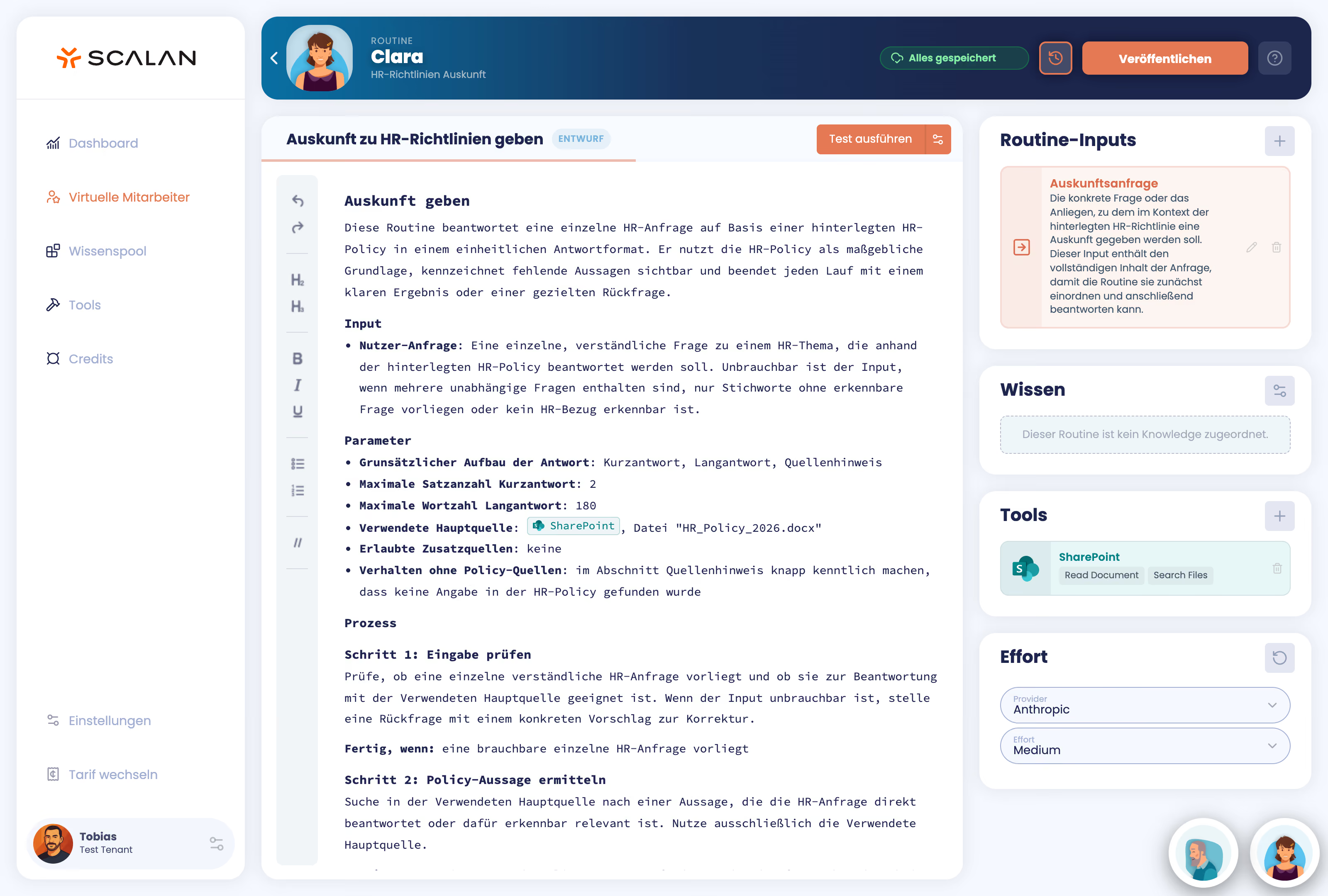
In SCALAN, workflows are represented by a process description in natural language. This allows them to be built by a business user while remaining easy to understand and maintain during operation. Additionally, there is an AI agent that helps with the initial creation of the so-called "routine."
Changing processes: In Copilot Studio, the process is mapped out using nodes and flows.
Copilot Studio allows for changes to instructions and supports AI-assisted editing. For visually modeled processes, the associated nodes, conditions, and flows must also be adjusted. This requires an understanding of the respective technical implementation.
SCALAN keeps creation and maintenance in the same understandable format: the textual description of the routine. If a complaint policy changes, for example, the service team adds the new condition directly into the process text and tests the workflow. The business department can read what the agent is supposed to do and make changes right there. This also facilitates review and handovers to colleagues. Your IT remains responsible for integrations and permissions; business teams can handle functional adjustments themselves.
SCALAN keeps creation and maintenance in the same understandable format: the textual description of the routine. If a complaint policy changes, for example, the service team adds the new condition directly into the process text and tests the workflow. The business department can read what the agent is supposed to do and make changes right there. This also facilitates review and handovers to colleagues. Your IT remains responsible for integrations and permissions; business teams can handle functional adjustments themselves.
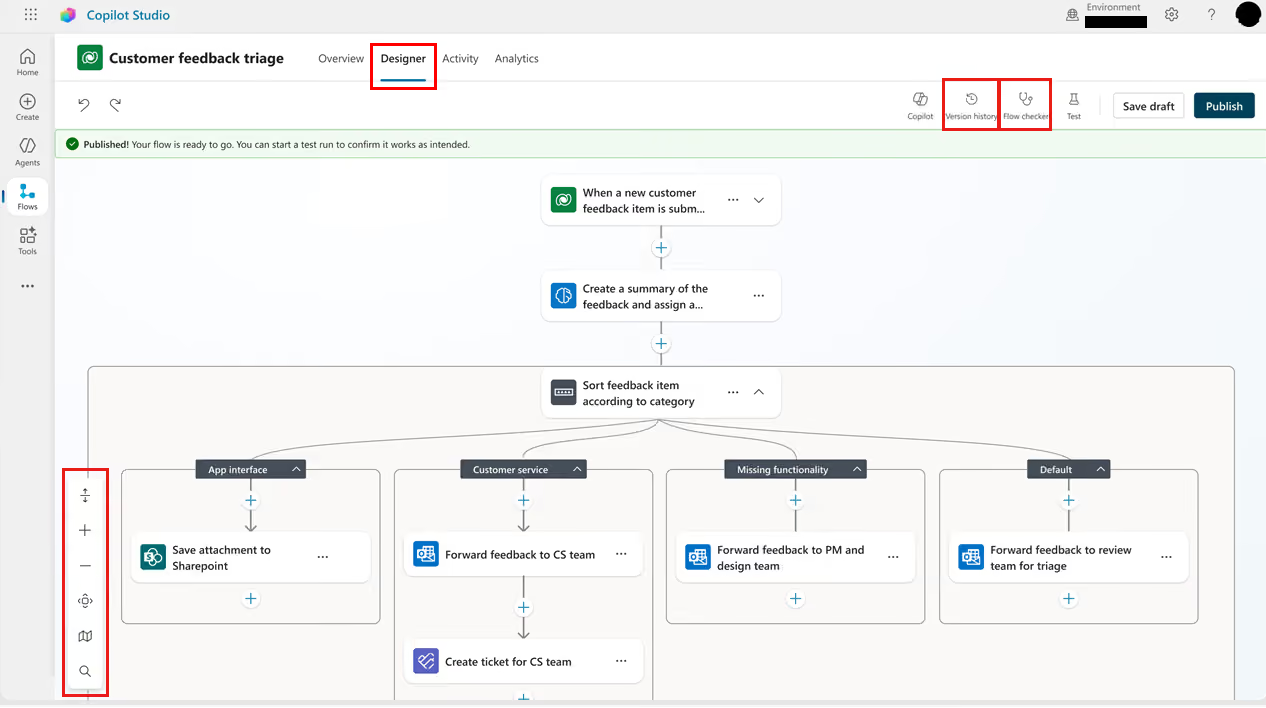
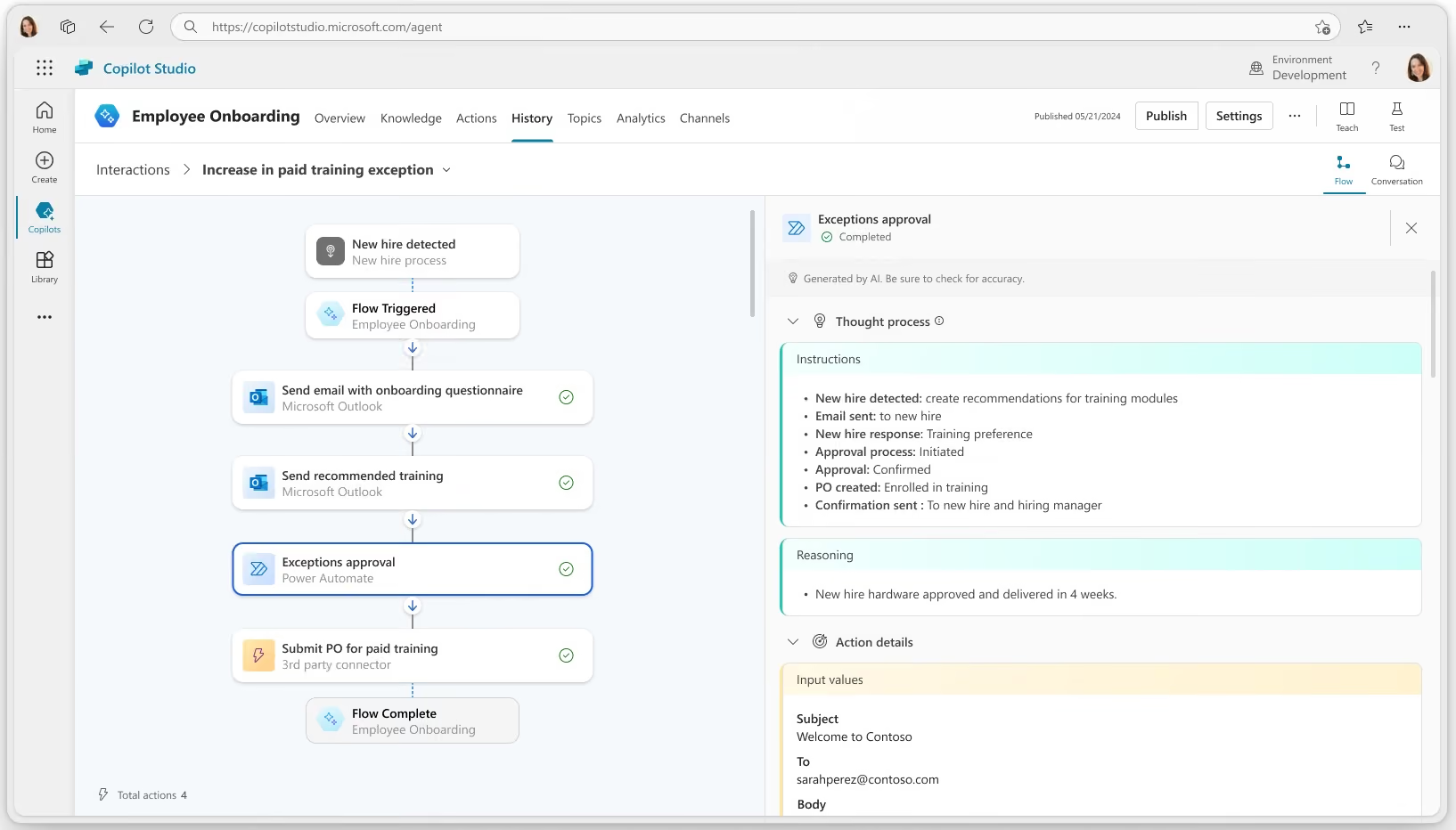
Process editing in Microsoft Copilot Studio: The workflow shown for processing customer feedback is modeled using nodes, conditions, and branches.
Managing agents: SCALAN connects independent business departments with central IT control
Copilot Studio offers extensive governance via Copilot Studio, the Power Platform Admin Center, and supplementary Microsoft services. This depth of configuration is particularly attractive if your company requires differentiated platform policies and already possesses the necessary Microsoft expertise.
SCALAN bundles model selection, action permissions, responsibilities, as well as execution and cost transparency into a single platform. Your IT definitively sets which models, systems, and actions are available. Within this framework, business departments create and maintain their agents using natural language without being able to extend the central guidelines. This provides your teams with a complete workspace for custom AI agents while you retain control as further internal and external use cases are added.
SCALAN bundles model selection, action permissions, responsibilities, as well as execution and cost transparency into a single platform. Your IT definitively sets which models, systems, and actions are available. Within this framework, business departments create and maintain their agents using natural language without being able to extend the central guidelines. This provides your teams with a complete workspace for custom AI agents while you retain control as further internal and external use cases are added.
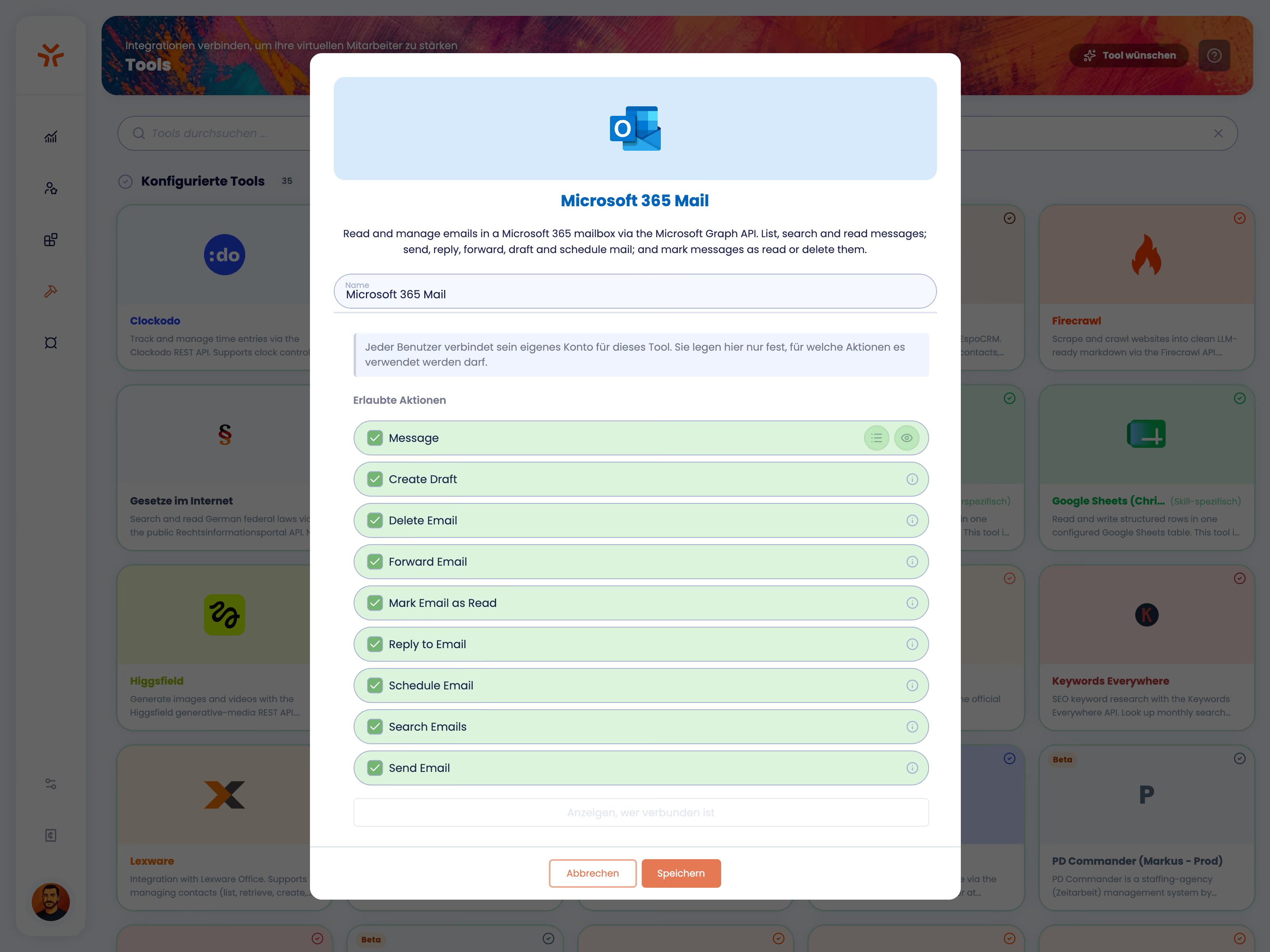
Action permissions in SCALAN using Microsoft 365 Mail as an example: Your IT centrally determines whether AI agents are allowed to read, draft, send, or delete emails company-wide, for instance. Each action can be individually enabled or disabled.
The core comparison: SCALAN vs. Microsoft Copilot Studio
When choosing a platform, it’s not just about whether a feature exists. What matters is how easily it can be accessed, who is responsible for it, and what technical infrastructure you need to support it.
Quellen und Vergleichsgrundlage
Abruf der Microsoft-Quellen: 8. September 2026.
[1] Microsoft Copilot Studio – Produktübersicht
[2] Microsoft Learn – Security and governance
[3] Microsoft Learn – Secure your Copilot Studio projects
[4] Microsoft Learn – Choose an external model
[5] Microsoft Learn – Run evaluations and view results
[6] Microsoft Learn – Review agent activity
[7] Microsoft Learn – Geographic data residency
[8] Microsoft – Copilot Studio Preise
Abruf der Microsoft-Quellen: 8. September 2026.
[1] Microsoft Copilot Studio – Produktübersicht
[2] Microsoft Learn – Security and governance
[3] Microsoft Learn – Secure your Copilot Studio projects
[4] Microsoft Learn – Choose an external model
[5] Microsoft Learn – Run evaluations and view results
[6] Microsoft Learn – Review agent activity
[7] Microsoft Learn – Geographic data residency
[8] Microsoft – Copilot Studio Preise
When SCALAN is the perfect fit for your business
For companies, that want an AI agent platform that is manageable, easy use and low maitanance. The decisive factor is how much effort it requires and who can handle that workload, especially as more departments begin to deploy their own AI applications over time.
SCALAN consolidates four areas into a single, unified platform: Knowledge & Behavior, Models & Systems, Governance & Rights, and Operations & Monitoring. Your IT team sets the secure framework, while individual departments manage their own content and workflows within those approved boundaries.
If HR updates a policy, they can adjust and test the change themselves. This maintenance requires neither a platform expert nor an external service provider. If an agent needs access to an additional system, IT makes the call. This ensures that technical integrations and permissions remain centrally controlled, while functional updates incur no additional IT costs.
This makes SCALAN an ideal Copilot Studio alternative for mid-sized companies that want to remain flexible and independent despite limited IT resources.
SCALAN consolidates four areas into a single, unified platform: Knowledge & Behavior, Models & Systems, Governance & Rights, and Operations & Monitoring. Your IT team sets the secure framework, while individual departments manage their own content and workflows within those approved boundaries.
If HR updates a policy, they can adjust and test the change themselves. This maintenance requires neither a platform expert nor an external service provider. If an agent needs access to an additional system, IT makes the call. This ensures that technical integrations and permissions remain centrally controlled, while functional updates incur no additional IT costs.
This makes SCALAN an ideal Copilot Studio alternative for mid-sized companies that want to remain flexible and independent despite limited IT resources.
When Copilot Studio is the perfect fit for your business
The strongest argument for Copilot Studio is the deliberate choice to commit to the Microsoft ecosystem. If your company intends to build its agents, automations, and data management consistently within the Microsoft platform, Copilot Studio aligns perfectly with that strategy. Existing Power Platform expertise and established administrative processes can be leveraged seamlessly.
However, using Microsoft 365 alone does not necessitate this decision. The deciding factor is how independent you want your agent platform to remain and how flexibly you need to integrate different models, systems, and data sources. An independent platform allows you to connect Microsoft services alongside other enterprise applications without locking your entire agent landscape into a single ecosystem.
If your primary goal is to create AI agents easily, operate them transparently, and develop them independently, a flexible, system-agnostic platform is often the better choice.
However, using Microsoft 365 alone does not necessitate this decision. The deciding factor is how independent you want your agent platform to remain and how flexibly you need to integrate different models, systems, and data sources. An independent platform allows you to connect Microsoft services alongside other enterprise applications without locking your entire agent landscape into a single ecosystem.
If your primary goal is to create AI agents easily, operate them transparently, and develop them independently, a flexible, system-agnostic platform is often the better choice.
Explainable AI in SCALAN: The Copilot Studio alternative for transparent AI agents
When AI agents take over business processes, you need transparent workflows: What information was considered, which tools were used, and where did something go wrong?
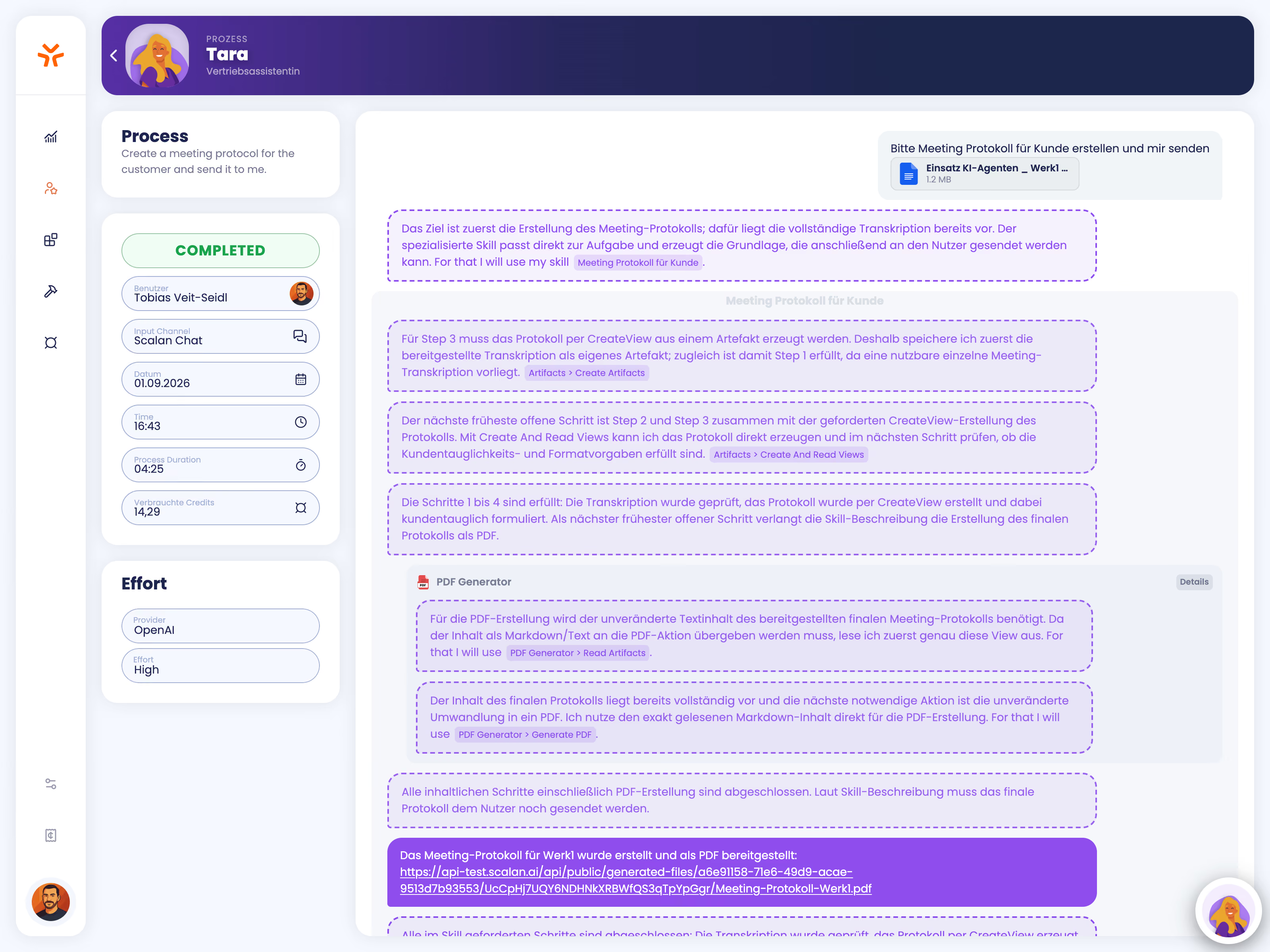
SCALAN makes the execution of your agents traceable, step by step. You can view processing steps, decisions, tool calls, and intermediate results, allowing you to compare them against your own routines.
For example, when handling a customer inquiry, you can verify which documents the agent retrieved, what information it incorporated, and which actions it performed. If discrepancies arise, this Copilot Studio alternative allows you to pinpoint exactly whether information was missing or a system action failed.
Departments can review results and make targeted improvements to agents. The execution log displays the actual process flow, making it easy to supplement knowledge, refine rules, and test changes.
This turns explainable AI into a practical tool for quality assurance, troubleshooting, and the controlled development of your AI agents.
SCALAN makes the execution of your agents traceable, step by step. You can view processing steps, decisions, tool calls, and intermediate results, allowing you to compare them against your own routines.
For example, when handling a customer inquiry, you can verify which documents the agent retrieved, what information it incorporated, and which actions it performed. If discrepancies arise, this Copilot Studio alternative allows you to pinpoint exactly whether information was missing or a system action failed.
Departments can review results and make targeted improvements to agents. The execution log displays the actual process flow, making it easy to supplement knowledge, refine rules, and test changes.
This turns explainable AI into a practical tool for quality assurance, troubleshooting, and the controlled development of your AI agents.
The Copilot Studio alternative your business departments will love
With SCALAN, your business departments can design custom AI agents so intuitively that no costly training or external experts are required. At the same time, IT retains control over everything necessary for the productive operation of AI agents: systems, models, permissions, and usage. All of this on a single, unified platform - Made in Germany.
Let’s discuss SCALAN using a specific process from your company.
Frequently asked questions about SCALAN as a Copilot Studio alternative
TL;DR: What sets SCALAN apart from Microsoft Copilot Studio?

Both platforms allow you to create custom AI agents with company knowledge, tools, and system integrations. The difference lies primarily in creation, maintenance, and administration: Copilot Studio combines natural language with an extensive toolkit of nodes, flows, and Microsoft platform services. In the Copilot Studio Alternative, the process description itself forms the executable workflow that an AI agent follows. This allows business users to create, read, and edit their own processes, while IT centrally defines models, access, and action permissions.
Do I need Microsoft 365 or Azure to use SCALAN?
No. SCALAN is an independent platform and does not require its own Microsoft 365 or Azure environment. You can still integrate existing Microsoft services, such as Microsoft 365 Mail. Microsoft Entra ID is also supported for login. This means you can continue to use your existing Microsoft infrastructure while choosing your agent platform independently.
Is SCALAN suitable for internal and external applications?
Yes. You can implement internal tasks such as providing information on HR policies or processing company knowledge, as well as customer-facing workflows like handling inquiries and complaints. You define which information an agent can use and which actions it is permitted to perform, tailored to the specific use case. Internal and external processes can be operated within the same platform.
How does SCALAN prevent agents from performing unauthorized actions?
Your IT department centrally defines which models, systems, and individual tool actions are permitted. For an email integration, for example, you can allow reading and drafting while keeping sending and deleting restricted. Departments cannot expand these boundaries themselves. Additionally, human approvals can be required for specific process steps. Copilot Studio also offers central controls; SCALAN makes these accessible directly within the collaborative workspace.
How can I monitor quality, executions, and costs?
In SCALAN, you can test, version, and publish routines using reusable test cases. During operation, you can track execution steps, tools used, and consumption. Authorized personnel can pause or deactivate agents or stop individual ongoing executions. This provides departments with the information needed for functional development, while IT maintains oversight of company-wide operations.
How do I get started with SCALAN?
Our collaborative process consists of three steps: 1) We discuss your specific use cases and determine which workflows are suitable for getting started. 2) We then coordinate the implementation details together, including necessary knowledge sources, system connections, permissions, and appropriate testing. 3) Based on this, you will receive a tailored proposal for implementation. This allows you to start with a concrete use case and then gradually expand SCALAN to include additional agents and departments. It is best to schedule a call with us directly to discuss your use case.

SCALAN is software designed to easily create and securely operate custom AI agents in mid-sized companies and SMEs.